SEO and visibility · SEO and visibility
Planning internal linking for SEO
A website can contain helpful content and still be difficult to use. This happens, for example, when a service can only be reached through a search function, a guide offers no suitable next step or a link is hidden behind an unclear label. Internal linking connects content so that visitors understand their route and can find relevant answers.
Crawlable links are also important for search engines to discover pages and recognise relationships. However, a useful structure is more than a technical collection of URLs. This guide shows you how to plan navigation, contextual links, regional pages and blog articles together, and how to check for missing, broken or unnecessarily complicated connections.
1. Understand internal links as paths between tasks
An internal link leads from one page of your website to another internal URL. It can appear in the main navigation, body text, a topic overview or a footer. Its main practical purpose is to help people find their way: after reading a general explanation, for example, an interested person should be able to reach the relevant service without having to guess how the website is organised.
In its link best practices, Google explains that links enable page discovery and help it understand page content. For Google to crawl a link reliably, it should generally be an HTML a element with an href attribute. A visually clickable area that relies on an event alone is not an equivalent substitute.
Internal links guarantee neither indexing nor better rankings. Nor do they replace clear content or working technology. Start with a simple question: which piece of content would genuinely help someone next at this point? If there is no convincing answer, the additional link will probably distract rather than provide direction.
3. Place contextual links where they fit the content
A contextual link appears where the additional information is needed at that moment. If a text explains regional service provision, a link to the relevant area page may be useful. If a section merely assumes knowledge of a technical term, an introductory article may be more helpful instead. Choose the destination based on the current question, not solely on your sales objectives.
| Link type | Suitable location | Example | Review question |
|---|---|---|---|
| Main navigation | Recurring page header | Services section | Is the label clear without prior knowledge? |
| Contextual link | Relevant paragraph | Explanation of a technical review | Does the destination explore this exact question? |
| Breadcrumb | Above the content | Homepage to services to offering | Is the visible hierarchy correct? |
| Related content | After an explanation | Guide to regional structure | Is the connection clear? |
| Table of contents | At the beginning of the article | Jump to the checklist | Does the section exist with a unique anchor? |
Avoid lists of links whose relationship is only understood internally. A short introductory sentence explains why the next piece of content is worth reading. Links within the text should be easy to recognise and reliable to use on mobile devices. Depending on the design, a difference in colour alone may not be enough; check emphasis, focus and contrast in the actual design too.
4. Connect services, regions and knowledge
Service pages explain who an offering is suitable for, what it includes and what the next step looks like. They can lead to more detailed guides where these provide factual answers to outstanding questions. Conversely, a blog article can link to a service when support with the problem described would be relevant. Such a link should remain recognisable as an offer and should not replace a neutral explanation.
Regional pages complement this structure when local information is genuinely relevant. Do not link to a region simply because its name appears somewhere in the text. The link should lead to a relevant question, such as the area served or the process for an on-site appointment. The article on regional pages for SEO explains which distinctions are useful.
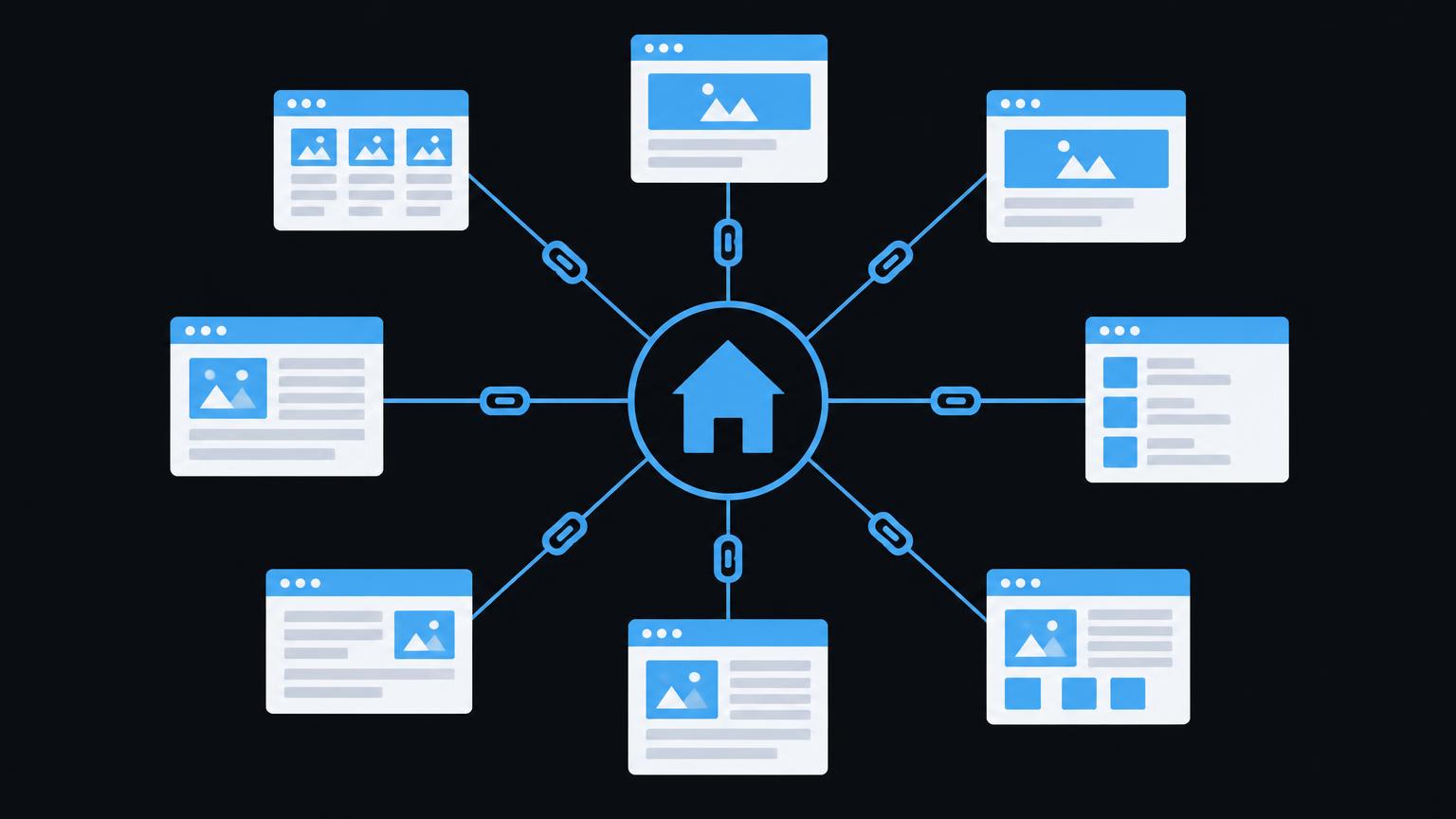
The network diagram connects the homepage, services, regions and blog articles according to their purposes. Not every page is connected to every other page. The homepage provides orientation, service pages explain offerings, regional pages give specific details about service provision and guides explore questions in greater depth. The model shows relationships, not a measured distribution of importance or a guaranteed effect on search rankings.
For related content, quality matters more than completeness. Show a few clearly relevant additions rather than automatically displaying every article in the same category. Review the suggested destinations again after revising content. A guide that was previously relevant may answer a different question after a change of focus and therefore become less helpful as a recommendation.
5. Make anchor text and destination URLs precise
Anchor text is the visible, linked text. It should clearly describe what can be expected at the destination. Wording such as information about the technical review is usually more helpful than a standalone here. Write naturally. Do not force repeated use of the same search phrase or insert long strings of words solely for search engines.
Pay attention to the sentence around the link. Even short anchor text can be understandable if its context clearly explains the destination’s purpose. Conversely, a seemingly precise label can mislead if the destination page no longer matches it. Review the anchor and destination together rather than just the string of characters in the text.
For ordinary internal links, point directly to the current preferred URL. Avoid unnecessary detours through old paths, protocol changes or avoidable redirects. For very similar content, link destinations and canonicals should align. The technical SEO fundamentals explain how accessibility, status codes and indexing relate to these decisions.
Have your internal linking reviewed for clear routes, missing entry points and technical detours with a [website analysis](/anfrage/website - analyse).
Send a non - binding enquiry6. Make click depth and orphan pages visible
Here, click depth describes the number of link steps from a defined starting point to a page. This perspective is useful, but comparisons are only meaningful with a clear starting point. An important service should be accessible without a lengthy search. This does not imply a universally applicable maximum number of clicks that serves as a ranking requirement for every website.
An orphan page is commonly understood to be a page with no discoverable incoming internal link. It may still be known through a sitemap or an external link, for example. However, this remains a problem for your own user journeys: someone browsing your website has no clear route to this content. Check, though, whether it is a deliberately excluded draft or a genuinely public page.
- Startseite → Leistung A
In the local demo, you connect fictional example pages. The display highlights pages that do not yet have an incoming link. This reveals a structural gap, not a website’s actual indexing status or quality. No scan takes place, no data is sent and nothing is stored. The reset function restores the initial state.
Use the model as a basis for discussion: which page needs an entry point from the navigation? Which guide should mention a relevant service? Which connection would be inappropriate in terms of subject matter? An additional link is only a good solution if it creates a useful route for people as well as a technical connection.
7. Fix broken links and redirect chains
A broken link may lead to a page that no longer exists, for example. Check both the technical status and the actual result. A page can load successfully in technical terms yet display an empty error message or irrelevant content. A status report alone is therefore not always sufficient for thorough quality control.
In a redirect chain, one URL first leads to a second and then to further destinations. These detours make maintenance harder and generate additional requests. Update your own links to the final relevant destination once it has been established. Do not thoughtlessly remove necessary redirects for old public URLs simply because internal links have already been corrected.
If there is no equivalent replacement, removing an outdated link may make more sense than redirecting it to an arbitrary destination. Keep a clear record of changes. For extensive migrations or legacy technical issues, a planned website improvement helps organise destination URLs, content and redirects together.
8. Support important pages without creating overload
Which pages are important depends on your offering and your audience’s needs. A contact option, a core service or a fundamental explanation may deserve a prominent entry point. However, not every commercially relevant page needs to appear in every paragraph. Prioritise according to the purpose of each page type and the next useful step.
Google’s best practices do not specify a magical ideal number of links per page. Nevertheless, too many simultaneous options can make navigation harder. Assess not only the quantity, but also grouping, labels and repetition. An extensive overview has a different purpose from a short service section or a single answer in a questions section.
Review recurring blocks particularly critically. An overcrowded footer containing every region and service does not automatically make a good structure. Check whether the routes provided remain understandable and usable on small screens. The relationship between SEO fundamentals and user journeys becomes especially clear here: technically present links alone do not make a website helpful.
9. Distinguish sitemaps from regular link reviews
A sitemap lists certain URLs for search engines and can help with their discovery. It is not a substitute for visible navigation and guarantees neither crawling nor indexing. A public page should therefore not appear only in an XML file if people are meant to find it through the website. Conversely, not every technical URL needs to be linked publicly.
Editorial and technical link review
- Important public pages have clear incoming links.
- Anchor text clearly describes the actual destination.
- Navigation and breadcrumbs use clear, consistent terms.
- Contextual links add to the question currently being discussed.
- Link destinations are accessible and their content is up to date.
- Internal links avoid unnecessary redirect chains.
- Section anchors and the table of contents work after changes.
- Keyboard operation and visible focus have been checked.
- The sitemap and internal linking structure are reviewed separately.
Plan reviews around specific events: new services, removed pages, a change to the URL structure or a substantial editorial revision. For any problems found, record the source, destination, issue and proposed correction. This allows a responsible person to review the change rather than simply receiving a long list of technical messages.
A professional search engine optimisation review considers internal links alongside content and technology. After making changes, monitor whether important routes work and whether people reach the information they expect. Search data can provide additional indications, but does not explain every individual change. Even a carefully planned structure promises neither a position nor guaranteed inclusion in generative answers.
Summary
- Internal links connect tasks and help people find their way.
- Navigation, breadcrumbs and section anchors serve different purposes.
- Anchor text should clearly describe the actual destination.
- Orphan pages need a useful entry point, not arbitrary additional links.
- Update broken destinations and avoid unnecessary redirect chains.
- A sitemap supports discovery but does not replace user journeys.
Frequently asked questions
How many internal links should a page contain?
There is no universal ideal number. Add links so that relevant next steps remain clear. An extensive overview may need more links than a short answer.
Are navigation links as useful as links in the text?
They serve different purposes. Navigation provides a recurring overview, while a link in the text can explore a specific question in more depth. Plan both forms to suit the context in which they are used.
What is an orphan page?
This usually means a page without a discoverable incoming internal link. It may still be known through other sources. Check whether it should be publicly accessible and which entry point would make sense in terms of subject matter.
Do all pages have to be reachable within three clicks?
There is no such universal ranking requirement. Important content should be accessible without unnecessary detours. Always assess click depth from a defined starting point and in relation to a specific task.
Does a sitemap replace internal links?
No. A sitemap helps search engines discover certain URLs, but does not provide normal visible navigation for users. Public content needs appropriate routes within the website.
Should I send internal links through redirects?
Where possible, link directly to the current relevant destination. Necessary redirects for old URLs can still remain in place. Before making a change, always check whether the destination content meets the original expectation.
Sources
- SEO Link Best Practices for Google | Google Search Central | Documentation | Google for DevelopersGoogle · checked on 2026 - 11 - 05
- What Is a Sitemap | Google Search Central | Documentation | Google for DevelopersGoogle · checked on 2026 - 11 - 05
- How to Specify a Canonical with rel="canonical" and Other Methods | Google Search Central | Documentation | Google for DevelopersGoogle · checked on 2026 - 11 - 05
Back to the top of the article